
If you are here, I'm sorry!
Probably means you are strugling to update your SSL before expires. Or as it happened to me today, after...
In Nginx Proxy Manager (NPM) you renew the certificate on the UI and this uses certbot internally.
There are multiple reasons your cert renewal could be failing and I'll cover the most common one and later on the one I was having issues with.
Sadly Nginx Proxy Manager is not our ally in this process, the UI will only show Internal Server Error giving us nothing to work with when trying to debug the issue. And as we will see, the UI is also not as helpful as it could be.
Open your ports
If you are using the standard way of creating certificates you must ensure your server ports 80 and 433 are reacheable for the internet.
This means going to your router port forwarding and ensuring such ports are open. After you can use a tool to check if your ports are open.
Keep in mind some routers have weird issues where it will stop forwarding a port. So try to delete and re-create your configuration entry.
Change your NPM landing page
If you are like me, your default landing page is a 404. This page is used when an unknown domain is queried to Nginx Proxy Manager.
Certbot will try to reach the host to validate the certificate and if it's unable the renewal may fail.
Go to Nginx Proxy Manager Settings tab and change the "Default Site" to "Congratulations Page".
I tried all that. Nothing works
Introducing DNS Challenge
Something I don't like about NPM is that, once a certificate is created there's no way on the UI to edit or see it's configuration.
There is a change that you, like me, are not using the standard way of creating certificates and instead you are using a DNS challenge.
What is a DNS challenge?
Normally, when we are exposing sites and creating certificates we will open the ports of our applications and expose them to the internet through our router.
That said some people either is unable to do that (CGNAT) or not want to do it in order to not expose their IP's. In such cases, we use what is called "tunnels".
Tunnels are basically a VPN connection between your server and a machine outside your network. That machine will act as a proxy for all your requests and since your are on a VPN tunnel you don't need to expose anything to the scary internet. A very common way to do use is to use Cloudflare Tunnels.
Given you don't expose anything directly you also can't validate a SSL certificate for your machine since the domain is not exposed through you but the tunnel. Hence DNS Challenge provide a way to verify that you are indeed the owner through DNS requests.
DNS Challenge update
When you created your certificate you probably filled something like the following image.
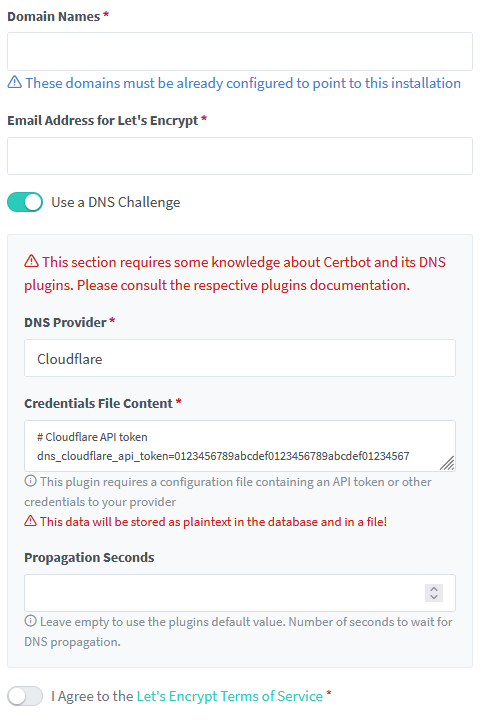
In Cloudflare case you need to provide a token and it will use that information to query cloudflare and validate that you are indeed the owner.
In my case, for reasons that I don't know or understand this process was not working so I had to recreate the api tokens. Once I changed the tokens everything worked again, here is what I had to do.
Go to Cloudflare Api tokens page (or whatever provider you are using).
- Create Token
- Edit Zone DNS Template
- Zone resource: choose your domain
Save & store the API Key somewhere safe.
Now is when I would like to go to NPM UI, change the key and done! But as I said before. Nginx Proxy Manager doesn't allow to edit these configurations so we need to do it in the machine directly.
SSH into your NPM instance and edit /etc/letsencrypt/credentials/credentials-$certID the ID may be different in each case. To me it was 4 and only had that one Cert.
The config looks similar to this and you need to change the <token> part.
# Cloudflare API token
dns_cloudflare_api_token = <token>
Once that is done go to the UI and renew your cert.
I found that my cert wasn't updated on NPM until I restarted openresty
service openresty restartConclusions
We have seen that the standard way to renew the certs is to make sure that the required ports are open and the landing page returns a 200 status code.
We also have learned that sometimes (CGNAT mostly) we use DNS Challenge instead. And in that case the resolution steps are different in nature.
Finally Nginx Proxy Manager could have been more helpful on the error and would make our life a bit easier if we where capable to edit the configurations on the UI after creating the certificates.
But overall, hopefully you where able to use the above information to solve your issue!